Adding PlugIns to Corel PaintShop Pro
Plug-ins are programs that integrate into another program adding new features and increasing functionality. Corel PaintShop Pro can install third-party plug-ins from other software developers.
All AKVIS plug-ins are compatible with PaintShop Pro (except Magnifier that works only with Photoshop). See the compatibility page.
Note: Some plug-ins have problems with selections made in Corel PaintShop Pro X5, X6. If the plugin does not work, check if there was a selection. Then deselect and call the plugin. In most cases, you can make a selection using the plugin's tools.
One of the most common questions is how to add plugins to a photo editor. Imagine: you found new great plugins in the Internet, installed them on your computer, but they did not appear in your photo editor.
If you have problems with adding plug-ins to Corel PaintShop Pro you can complete the installation manually.
How to make a plugin appear in PaintShop Pro?
You can either copy the 8bf files (Method 1) or add the plugin folder in the preferences (Method 2, recommended).
- Method 1. Copy a 8bf file to the PlugIns folder of the image editor.
Let's take as an example the AKVIS ArtSuite plugin. Copy the 8bf file from Program Files\AKVIS\ArtSuite\ into the Plugins folder.
- PaintShop Pro CC 2022:
Copy ArtSuite_64.8bf into:
C:\Program Files\Corel\Corel PaintShop Pro 2022 (64-bit)\PlugIns\EN\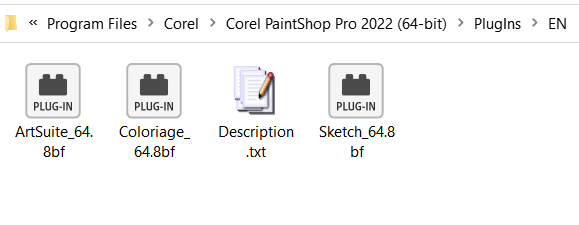
- PaintShop Pro X6 64-bit:
Copy ArtSuite_64.8bf into:
ArtSuite_64.8bf in C:\Program Files\Corel\Corel PaintShop Pro X6 (64-bit)\PlugIns\EN\ - PaintShop Pro X6 32-bit:
Copy ArtSuite.8bf into:
C:\Program Files (x86)\Corel\Corel PaintShop Pro X6\PlugIns\EN\
For other versions of the editor you can search for a folder named "PlugIns" in the PaintShop Pro directory.
You can also copy the files into the C:\Program Files\Corel\Plugins folder.
- PaintShop Pro CC 2022:
- Method 2. You do not need to copy or move anything, you only have to set up preferences once in order to use them again.
The advantage of this method is that even if you upgrade your plugins, they will be automatically updated in the Effects list.
Follow the instructions:
Run Corel PaintShop Pro and call the command File -> Preferences -> File Locations…
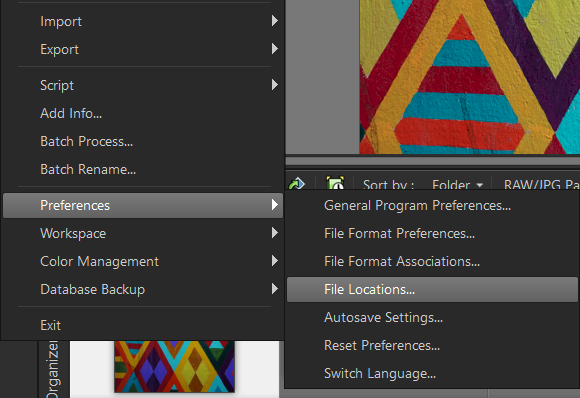
Select the Plug-ins item in the left part of the opened File Locations dialog box.
In the right part check Enable plug-ins… and press the Add button.
Browse to find the plugin's folder. For example, to add the AKVIS plugins to PaintShop Pro, select the folder AKVIS in the programs list: C:\Program Files\AKVIS.
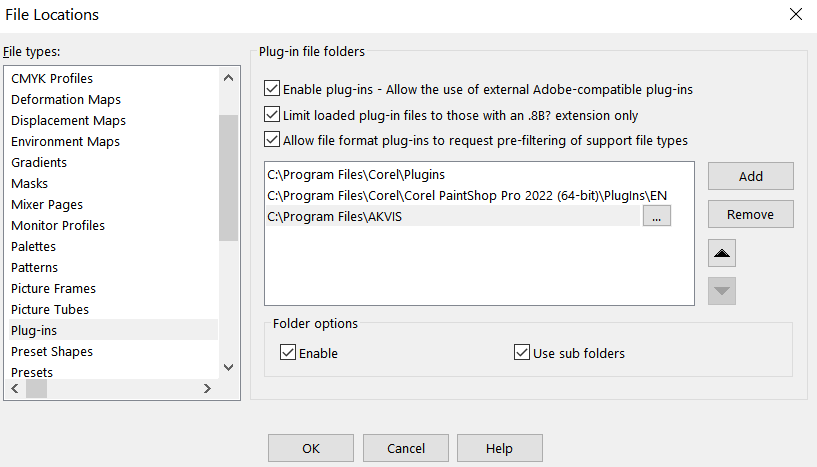
The Use sub folders option must be checked. Then all sub-folders (for all plugins by AKVIS) will be used by PaintShop Pro. Now whenever you install a new plugin by AKVIS on your computer, it will be added to the Corel program automatically.
Now go to the menu Effects to look for the installed plug-ins: Effects -> Plugins -> AKVIS…
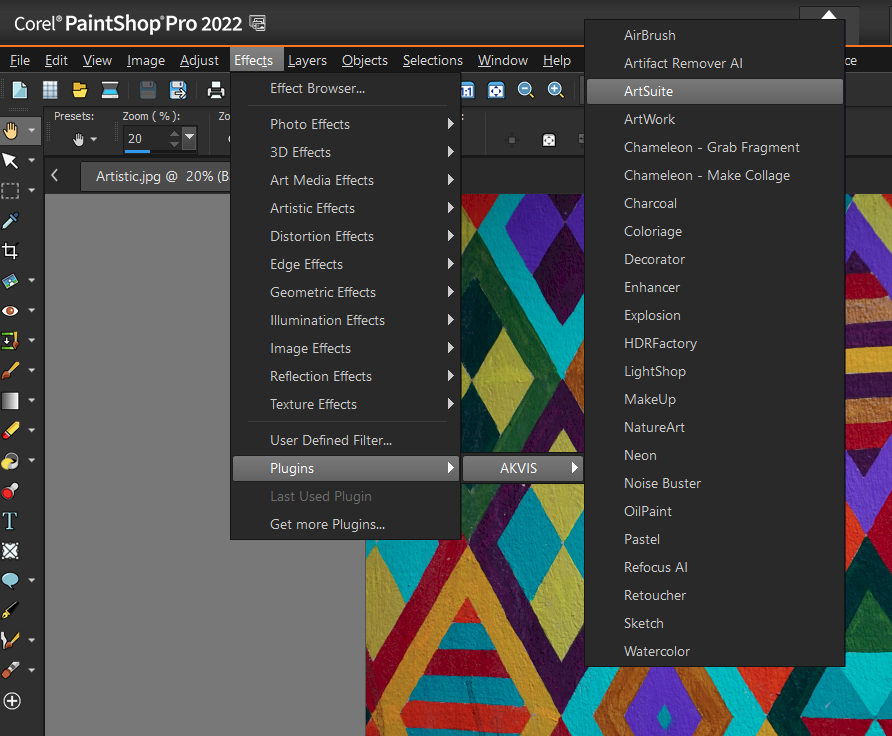
Here you can find some PaintShop Pro compatible plug-ins.